

iPhone · iPad · Android
Japanese reading at your level, on your phone
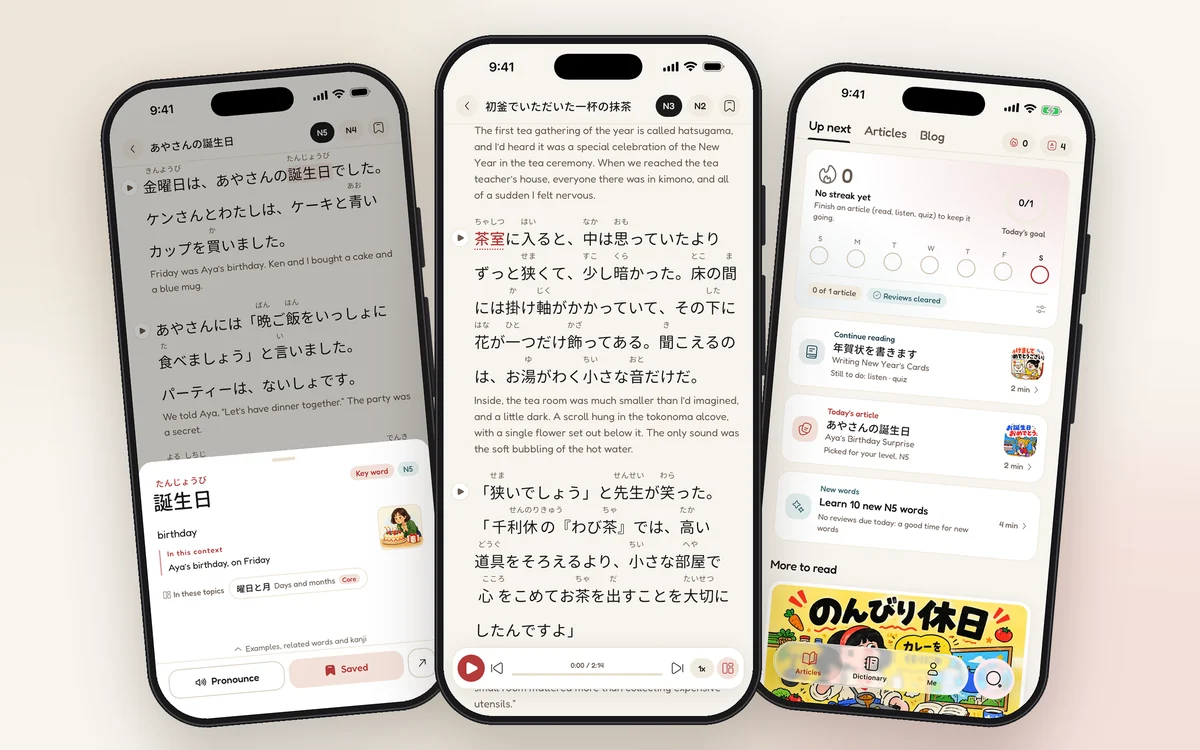
Graded stories from N5 to N1 with furigana, a tap on any word for its reading and meaning, audio and a short daily plan. Your saved words, progress and Pro are the same as on the website.
- Free to download · Pro optional
- No ads
- One account for app and website
On a computer? Scan with your phone
What the app does
01
Read at your JLPT level
Stories written for each level from N5 to N1, with furigana above the kanji that you can show or hide.
02
Tap a word for its reading and meaning
See what a word means in this sentence, hear it, and save it to your word book with one tap.
03
Listen and check the translation
Articles are read aloud by natural voices, and every paragraph has its translation one tap away.
04
Review the words you save
Saved words come back for review on a memory curve, so they stay with you.
05
Read a little every day
A daily goal, a streak and today's reading plan picked for your level.
06
Kana and kanji, stroke by stroke
Hiragana and katakana charts with sounds, and kanji pages with readings, meanings and animated stroke order.
Questions
Which devices does the app run on?
iPhone and iPad with iOS or iPadOS 17 or later, from the App Store. Android devices with Android 7.0 or later, as an APK from jlptread.com.
Why can't I find it in my App Store?
The iPhone and iPad app is on the App Store in most countries and regions, but not in mainland China. There you can use the Android app or read on the website with the same account.
Is it the same account as the website?
Yes. Sign in with your JLPT Read account and your saved words, reading progress and streak are the same in the app and on the website.
If I get Pro on one device, does it work on the others?
Yes. Pro belongs to your JLPT Read account, not to a device or a store: whether you bought it in the iPhone or iPad app, in the Android app or on the website, it works wherever you sign in with that account. If you bought Pro in the iPhone app before creating an account, it moves to your account when you sign in. A subscription bought through the App Store is managed and cancelled in your Apple account settings; one bought on the website or in the Android app is managed on jlptread.com.
What can I do for free?
Reading every published article with furigana, translations and audio, looking up and saving words, and reviewing them are free. Pro adds more voices and fonts, full article videos, inference questions and higher limits for the AI tools.
How much does it cost?
The app is free to download and reading is free. Pro is optional: on the website and in the Android app it costs $2.99 a month, $29.99 a year or $89.99 once; in the iPhone and iPad app the App Store shows the price for your country.
Why isn't the Android app on Google Play?
For now we publish the Android app ourselves, as an APK on jlptread.com. It is the official app, signed with our certificate, and it tells you when an update is ready. The download page shows how to install it and how to check that the file is genuine.
Are there ads?
No. The app has no ads and no advertising SDKs, on iPhone, iPad or Android.
Who makes JLPT Read?
JLPT Read is made by Guan Wei, an independent developer, and published under the JLPT Read name. Send questions and corrections to support@jlptread.com.